Stop installing Tabler Icons: build a sprite instead
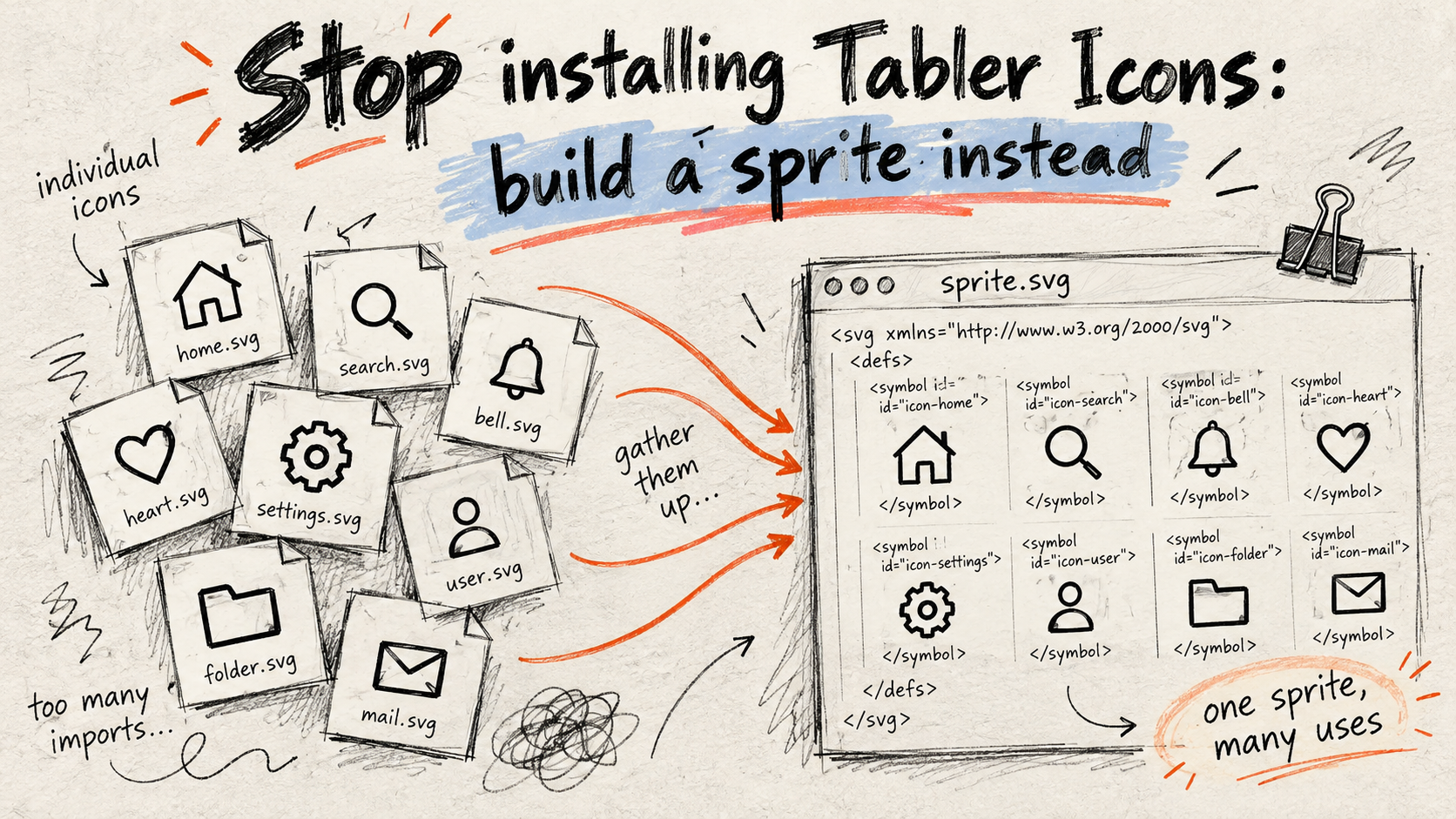
Every time I ask a coding agent to add an icon to a project, the same thing happens: it runs npm install @tabler/icons-webfont. It is the obvious move. It is also a bad one.
This blog entry serves as a memory for all my future projects too :-)
What that install actually costs
@tabler/icons-webfont declares the toolchain that builds the font (svgtofont and its friends) as runtime dependencies. Installing it pulls in around 200 packages, so you can use two prebuilt files that were already sitting in the tarball.
The other package, @tabler/icons, has no such dependency problem, but it ships every icon in every style: thousands of SVG files for the few dozen a project actually uses.
And the webfont itself is heavy for what it does. In a real project of mine:
| Size | |
|---|---|
tabler-icons.woff2 |
462 KB |
tabler-icons.min.css |
211 KB |
| Sprite with the 92 icons the project uses (example) | 27 KB (4.6 KB gzipped) |
The idea
Both packages are on npm, which means jsDelivr serves any file from any version at a stable URL:
https://cdn.jsdelivr.net/npm/@tabler/icons@3.46.0/icons/outline/search.svg
https://cdn.jsdelivr.net/npm/@tabler/icons@3.46.0/icons/filled/heart.svg
So there is nothing to install. A small script can:
scan the project for the icon names it uses;
fetch exactly those SVGs, at a pinned version;
wrap each one in a
<symbol>and write a single sprite file.
The script
No dependencies. It runs with Bun or Node 18+ (anything with a global fetch).
// Build an SVG sprite with the Tabler icons the project uses.
// Icons are fetched from jsDelivr: @tabler/icons is never installed.
import { readdirSync, readFileSync, writeFileSync } from "node:fs";
import { extname, join } from "node:path";

// --- configuration ---------------------------------------------------------
const TABLER_VERSION = "3.46.0";
const SCAN_DIRS = ["templates", "src", "assets/js"];
const SCAN_EXT = new Set([".html", ".php", ".twig", ".js", ".ts"]);
const OUTPUT = "public/assets/icons.svg";
// Icons whose name is built at runtime, so the scan cannot see them.
const EXTRA = [];
// ---------------------------------------------------------------------------

const BASE = `https://cdn.jsdelivr.net/npm/@tabler/icons@${TABLER_VERSION}/icons`;
const SKIP = new Set(["node_modules", "vendor", ".git", "dist", "build"]);
// `ti-search` or `ti-heart-filled`, not preceded by a word char or dash
// (so `--ti-x` custom properties and `multi-select` do not match).
const USAGE = /(?<![\w-])ti-([a-z0-9]+(?:-[a-z0-9]+)*)/g;

function* files(dir) {
  let entries;
  try {
    entries = readdirSync(dir, { withFileTypes: true });
  } catch {
    return;
  }
  for (const entry of entries) {
    if (SKIP.has(entry.name)) continue;
    const path = join(dir, entry.name);
    if (entry.isDirectory()) yield* files(path);
    else if (SCAN_EXT.has(extname(entry.name))) yield path;
  }
}

const names = new Set(EXTRA);
for (const dir of SCAN_DIRS) {
  for (const file of files(dir)) {
    for (const [, name] of readFileSync(file, "utf8").matchAll(USAGE)) {
      names.add(name);
    }
  }
}

async function symbol(name) {
  const filled = name.endsWith("-filled");
  const file = filled
    ? `filled/${name.slice(0, -"-filled".length)}.svg`
    : `outline/${name}.svg`;
  const response = await fetch(`${BASE}/${file}`);
  if (!response.ok) return null;
  const svg = await response.text();
  const body = svg
    .replace(/^[\s\S]*?<svg[^>]*>/, "")
    .replace(/<\/svg>\s*$/, "")
    // Tabler's invisible 24×24 bounding box, useless in a sprite.
    .replace(/<path stroke="none" d="M0 0h24v24H0z" fill="none"\s*\/>/, "")
    .replace(/\s*\n\s*/g, "")
    .trim();
  // stroke-width is left to CSS so it can be adjusted per context.
  const paint = filled
    ? 'fill="currentColor" stroke="none"'
    : 'fill="none" stroke="currentColor" stroke-linecap="round" stroke-linejoin="round"';
  return `<symbol id="ti-${name}" viewBox="0 0 24 24" ${paint}>${body}</symbol>`;
}

const sorted = [...names].sort();
const symbols = await Promise.all(sorted.map(symbol));
const missing = sorted.filter((_, i) => symbols[i] === null);
if (missing.length) {
  console.error(`Unknown Tabler icons (v${TABLER_VERSION}): ${missing.join(", ")}`);
  process.exit(1);
}

writeFileSync(
  OUTPUT,
  `<svg xmlns="http://www.w3.org/2000/svg" style="display:none">\n${symbols.join("\n")}\n</svg>\n`,
);
console.log(`${sorted.length} icons → ${OUTPUT}`);
Add it to package.json and run it whenever you add an icon:
{ "scripts": { "icons": "node scripts/tabler-sprite.js" } }
A few choices worth explaining:
Ids keep the webfont names (
ti-search,ti-heart-filled). The scan finds bothclass="ti ti-search"andhref="#ti-search", so you can migrate from the webfont one template at a time.An unknown name fails the run. A typo shows up in your terminal, not as an empty square on a page you might never look at.
stroke-widthis not baked in. It is set from CSS, so you can thin icons out in a dense table without regenerating anything.The version is pinned in the script, not in
package.json. Upgrading is one line, and if Tabler renamed an icon in between, the script tells you which.
Using the sprite
<svg class="icon" aria-hidden="true">
  <use href="/assets/icons.svg#ti-search"></use>
</svg>
.icon {
  width: 1em;
  height: 1em;
  stroke-width: var(--icon-stroke, 2);
  vertical-align: -0.125em;
  flex-shrink: 0;
}
Colour follows currentColor and size follows font-size, exactly like the webfont, but you get real SVG rendering, with no font hinting and no line-height surprises.
For an icon-only button, the accessible name goes on the button, not the icon:
<button type="button" aria-label="Search">
  <svg class="icon" aria-hidden="true"><use href="/assets/icons.svg#ti-search"></use></svg>
</button>
One trap: an external sprite only works same-origin and over HTTP. <use href> pointing at another domain, or a page opened from file://, renders nothing. If your assets live on a CDN, inline the sprite once at the top of <body> and reference #ti-search directly.
Telling your agents
The script only helps if the agent knows it exists. This goes in every project's AGENTS.md:
Tabler icons are never installed from npm — not
@tabler/icons-webfont, not@tabler/icons. Icons come fromscripts/tabler-sprite.js, which fetches the SVGs used by the project from jsDelivr at a pinned version. To add an icon, use it in the markup (#ti-<name>) and run theiconsscript. Names are checked on https://tabler.io/icons.
One paragraph in the instructions file, and the agent reaches for the script instead of npm install.
About the author
A Web Developer based in Belgium, specialized in PHP & JS development
Comments
Join the discussionNice approach, and the size table makes the case well. Two things that might be worth a line in the post:
The build now needs jsDelivr to be reachable, so committing the generated sprite (or caching the fetched SVGs) keeps CI reproducible when the CDN is slow or blocked.
And if the sprite is referenced with , the file has to come from the same origin as the page, because does not load cross-origin files. That one shows up when static assets move to a separate CDN domain.